在子文件夹中托管 Spaces
4 分
使用 Archbee 托管文档的默认方式是在您的自定义域上,例如 docs.piedpiper.com。若要在主域名的子文件夹中提供文档,例如 https://www.piedpiper.com/docs,则需要访问您的 web 服务器,以便能够将请求代理到我们的系统。
您仍然需要设置一个默认的自定义域,然后从主域名代理到它。我们会确保 Google 不会将其视为重复内容,并通过自定义 规范 标签进行标识。
步骤 1:按照下图输入可选代理
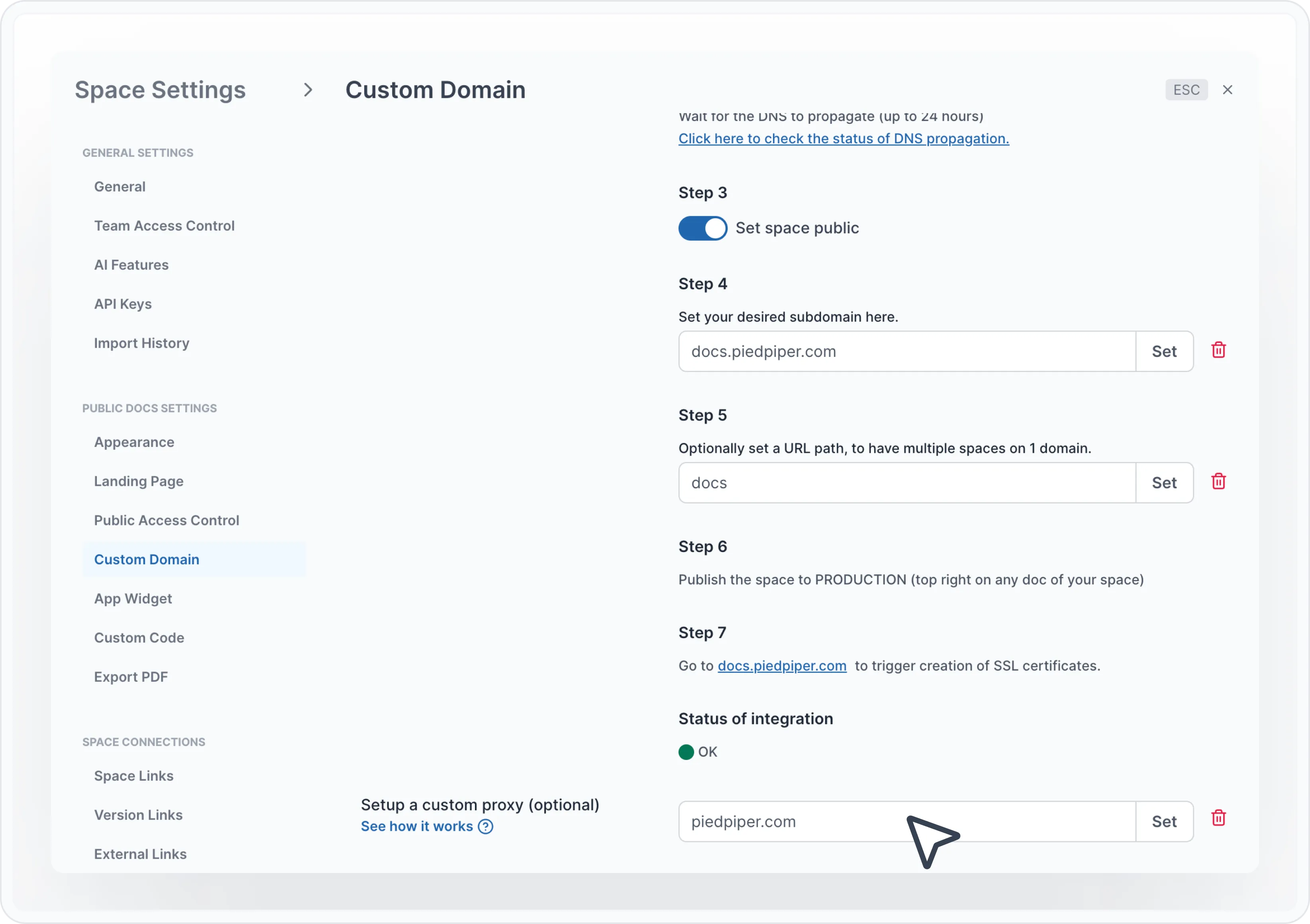
在此处时,请确保 步骤 5 中的 URL 路径与您在下方 web 服务器配置中设置的路径一致。
步骤 2:以下是几个常见 web 服务器的示例,用于配置代理系统的运行方式
Nginx 服务器配置
location /docs {
    proxy_ssl_server_name on;
    proxy_pass https://docs.piedpiper.com/docs
    proxy_set_header Host docs.piedpiper.com;
    proxy_set_header X-Real-IP $remote_addr;
    proxy_set_header X-Forwarded-For $proxy_add_x_forwarded_for;
    proxy_set_header X-Forwarded-Proto $scheme;
    proxy_set_header "requested-by" "proxy";
}
Apache 服务器配置
请确保安装并启用了以下模块:
sudo a2enmod proxy
sudo a2enmod proxy_balancer
sudo a2enmod proxy_http将以下内容添加到站点配置文件的 /etc/apache2/sites-available
例如: 000-default.conf
SSLProxyEngine on
ProxyPass "/docs" "https://docs.piedpiper.com/docs"
ProxyPassReverse "/docs"  "https://docs.piedpiper.com/docs"
我们测试通过的完整域名配置如下所示:
<VirtualHost *:80>
   ServerName piedpiper.com
   DocumentRoot "/app"
   <Directory "/app">
       Options Indexes FollowSymLinks
       AllowOverride All
       Require all granted
   </Directory>

   SSLProxyEngine on
   ProxyPass "/docs"  "https://docs.piedpiper.com/docs
   ProxyPassReverse "/docs"  "https://docs.piedpiper.com/docs"
</VirtualHost>重启 Apache 服务器:
例如,如果您在 Linux 上使用 Apache:
$ sudo service apache2 restartHave a question?
Our super-smart AI, knowledgeable support team and an awesome community will get you an answer in a flash.
To ask a question or participate in discussions, you'll need to authenticate first.